Join the free beta

Every part, and whether it works today

Levelog reads the gate, the logs, the drawings, the group chat and the city’s records, and sends the job’s report on a schedule. Each part below carries one of four statuses.

Checked against the deployed product’s code: reports on November 22, 2026, security on November 21, everything else on November 18.

Four statuses

Live
In the product today.
Beta
In the product today for beta users, still changing.
In pilot
Running on a few jobs with us, not open to everyone.
In build
Being built. Not in the product and not in the free beta today.

A line marked Limit states something the product does not do.

Reports

LEVELOG · CONSTRUCTION PROGRESS REPORT

Harbor Row Tower

Harbor Row, Brooklyn, NY (demo job) · Demo General Contractor

Nov 5–18, 2026

Custom period · prepared Nov 18, 2026

High riskSet by the highest risk in this report. Not a judgment of schedule, cost or quality.

  • 9 / 9Working days with site activity
  • 31Average workers on site per day▼ 1.1 vs previous (32.1)
  • 34Peak workforce · Nov 13
  • 6Subcontractors on site

First risk in this report HIGH 3 DOB/DOT violations or complaints open: DOB violation DEMO-ECB-0412, DOB complaint DEMO-C-4471 and DOB violation DEMO-ECB-0398.R1R2R3

Sample report. Words and numbers are the report engine’s output on demo data, laid out here for the web. The product sends it as a PDF.

The app’s Reports screen. Tick any of the five schedules (daily, weekly, bi-weekly, monthly, quarterly), the admins and project managers who get them, and WhatsApp, email or both. On demand needs no schedule: press Generate now. If the PDF cannot be attached, a link that needs no login works for 30 days.

Drawn from the app’s own screen text; not a screenshot. Names and choices are demo data.

Send automatically

Reports

  • DailyThe daily report, at its send time, on
  • WeeklyMondays 8am · the week before, on
  • Bi-weeklyEvery other Monday 8am · 2 weeks, off
  • Monthly1st of the month 8am · the month before, on
  • QuarterlyJan, Apr, Jul, Oct 1st 8am · the quarter before, off

Send to

  • Alex Moreno · Admin, on
  • Project manager (demo) · PM, on

How

  • WhatsApp (the PDF in a DM), on
  • Email (the PDF attached), off

Generate now

  • Last 7 days
  • Last 2 weeks
  • This month
  • Last month
  • This quarter
  • Whole project
  • Custom range

Pick at most 400 days.

Generate

Daily report — time (New York)

  • 6:00 AM
  • 12:00 PM
  • 3:00 PM
  • 5:00 PM
  • 6:00 PM
  • 7:00 PM
  • 8:00 PM
  • 9:00 PM

Daily report — also email to

owner@example.com

email@example.comAdd

Reports

  • Nov 9–15, 2026Weekly · ScheduledOpenDownloadShare
  • Nov 5–18, 2026Made in the app by Alex MorenoOpenDownloadShare
  • Five schedules, in any combination for each job: daily, weekly, bi-weekly (every two weeks), monthly and quarterly. Weekly to quarterly reports are off until an admin turns them on for a job. On demand is the sixth way to get one, and needs no schedule.

    Live
  • On demand. In the app: Project, Reports, Generate now, with six presets or any range up to 400 days. Or ask in a private WhatsApp message. Six reports per person in ten minutes.

    Live
  • Built from the job’s own records: gate check-ins, filed daily logs and their photos, the daily site inspection items in the log, and DOB and DOT records as of the period’s last day.

    Live
  • What a progress report shows. Work by subcontractor and floor, workforce by day, changes since the last period, up to six risks read from the records, and dated items in the next 30 days.

    Live
  • Percent complete is an estimate from the daily logs, made by a fixed rule and printed as estimated. It is not measured on site.

    Live
  • Planned vs actual, when you import and confirm your schedule. Milestones with original and current dates, and days of slip. The dates are the file’s own. No cause is given. Without a schedule on file the report says so.

    Live
  • Every section names its source: G for gate check-ins, L for filed logs, R for a city record, S for the schedule. The last page lists every record used. City records link to the city’s site. What was printed is stored with the report.

    Live
  • Sent as a PDF by WhatsApp or email, to the company’s admins and the project managers on the job. The daily report can also go to any email address an admin adds. If the PDF cannot attach, a link opens it for 30 days.

    Live
  • When it goes. The daily report at the time you set, 6 p.m. by default. Weekly and bi-weekly reports on Mondays at 8 a.m., monthly and quarterly on the 1st at 8 a.m., New York time.

    Live
  • No AI writes the report. Fixed templates turn the records into its words. A vision model screens the daily-log photos for the photo page. The samples on this site have no photo page: their demo logs carry no photographs.

    Live
  • One layout. No custom sections, templates or branding, and no schedule for each person.

    Limit
  • No separate edition for owners, subcontractors or preconstruction. An owner reads the contractor’s report. A subcontractor account cannot be a recipient.

    Limit
  • A finding is tagged and indexed, not linked. You cannot click from a finding to its log or photo. Only city records are links.

    Limit
  • Not in a report: the drawings, the group chat, punch items, financial figures, the cause of a delay, or a crew look-ahead.

    Limit

At the gate

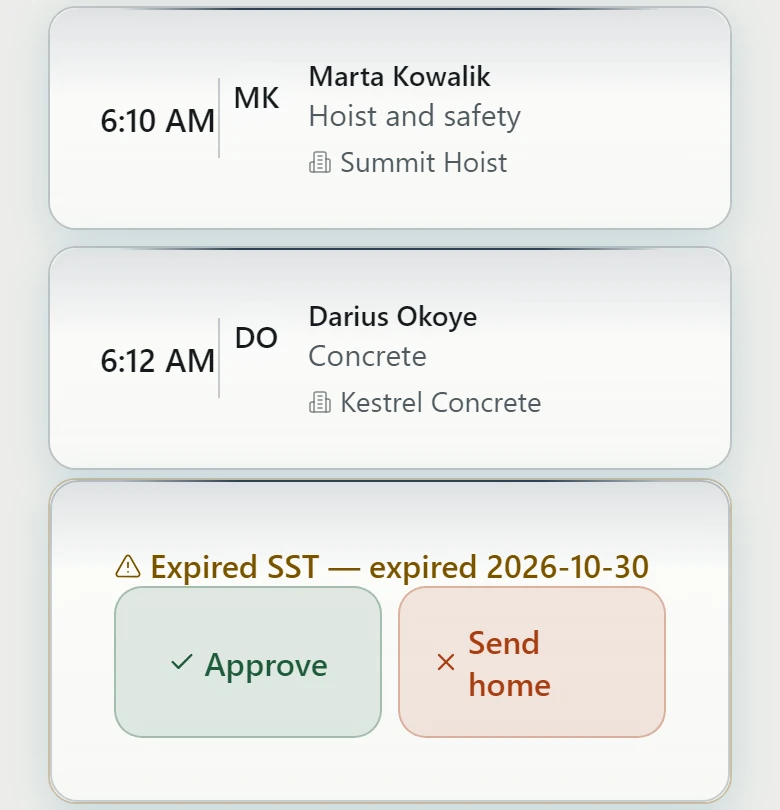
Today’s check-ins in Levelog on a phone: two workers with their trade and company, and a check-in flagged for an expired SST card, with Approve and Send home
The real app, on a demo job.
  • Check-in on the worker’s own phone. A worker taps an NFC tag or scans a QR code at the gate, and a page opens in the phone’s browser. Nothing to install, no password. Check-in needs a signal.

    Live
  • English or Spanish. The worker chooses on the check-in page.

    Live
  • The safety card is read from a photo. The worker photographs an SST or OSHA card. The number, the expiry date and the status are kept on that check-in. Cards read: SST Full, Limited, Supervisor and Temporary, and OSHA 10 and 30.

    Live
  • An expired or unreadable card is flagged for the competent person. The worker is not locked out. Expiry is checked again every night.

    Live
  • The city validates the card, in its own Training Connect app. Levelog reads the card and keeps what it read.

    Limit

In the plans

  • Drawings from the PDF set. Upload it, or link a Dropbox folder. A PDF can be up to 100 MB.

    Live
  • Ask the drawings in WhatsApp. Ask in plain words in the job’s group. The answer is the printed line with its sheet number, or the whole sheet if you ask for it. If it finds nothing it says “not found”, and that answer can be wrong. An admin switches plan questions on for each group.

    Live
  • Plans saved to the phone open with no signal. A site tablet keeps the job’s approved set.

    Live
  • Schedule import. From Primavera P6, Microsoft Project, Excel or CSV, or a text PDF. An admin confirms it.

    Live
  • Takeoff from the PDF set. Every count is traced to its sheet and tag. Pilot jobs get doors and windows, equipment, roof drains and areas as a spreadsheet. A count it cannot verify is listed as refused. The app has no takeoff screen.

    In pilot
  • 3D model from the PDF set. Each floor as its sheets describe it. No BIM model to supply.

    In build
  • Clash check from the PDF set. Each place two runs occupy the same space, with the sheets it came from.

    In build
  • Estimating from the takeoff. Quantities for the estimate, each traced to its sheet.

    In build

On the deck

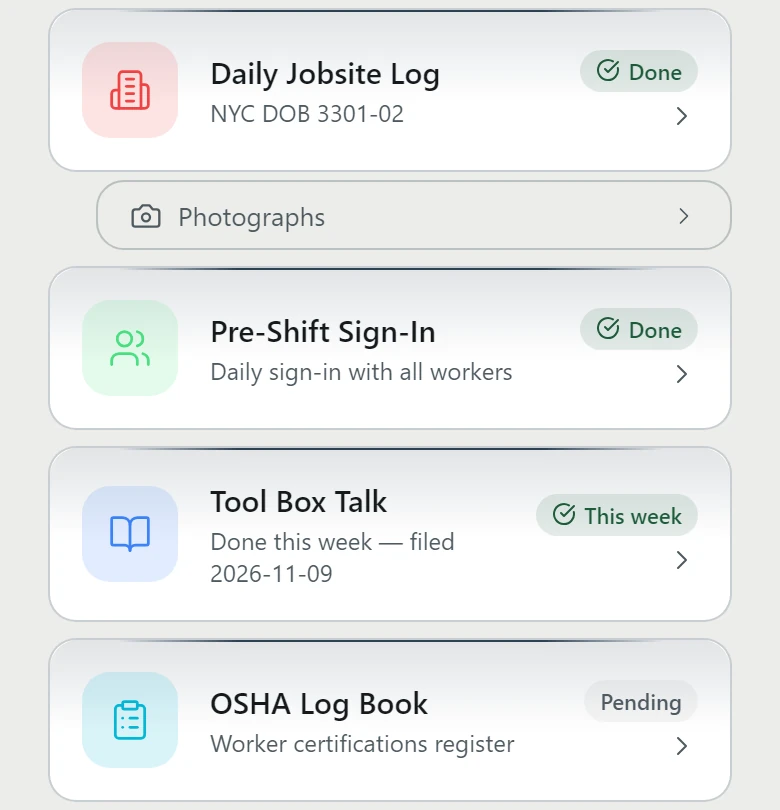
The Levelog logbooks screen on a phone: the Daily Jobsite Log and Pre-Shift Sign-In marked done
The real app, on a demo job.
  • 13 kinds of logbook, signed on a phone. Among them the Daily Jobsite Log (laid out to NYC DOB rule 3301-02), Pre-Shift Sign-In, Tool Box Talk, OSHA Log Book, SSC/SSM Daily Safety Log and Concrete Operations Log.

    Live
  • Every signature writes a ledger entry: who signed, their role, the time, the device and a hash of what was signed. A correction is a linked amendment with a required reason. The original stays on file.

    Live
  • Logbooks keep working with no signal. Drafts, signatures and photos save on the phone and sync when it reconnects.

    Live
  • “Hand to Inspector” on the site tablet shows the logbooks read-only.

    Live
  • Walkthroughs. A project manager or admin starts one in a WhatsApp message and sends photos. Each photo becomes a punch item. The manager reviews the list and sends it.

    Live
  • One private link for each sub. It shows only that sub’s items, in English or Spanish. The sub taps “I fixed it” and can add a photo. Only the contractor closes an item. Sending is switched on for each job.

    Live
  • Daily report by email. It goes out at the job’s send time (6 p.m. by default) to the addresses the contractor adds, inside or outside the company. It lists each required log as filed or missing, the weather and photos.

    Live
  • Reminders to subcontractors. Levelog does not follow up with subs for you. It records who is waiting on whom and tells you.

    Limit

Across the company

  • A job needs a name and an address. The first scan of the city’s record finishes within 15 minutes.

    Live
  • The city’s records, checked for every address. DOB about every 15 minutes, 311 every 30 minutes, DOT every 2 hours. How long the city takes to post something is outside our control.

    Live
  • Critical items go out by email with a recommended next step, to company admins and the assigned project manager. A short notice also posts to the job’s WhatsApp group.

    Live
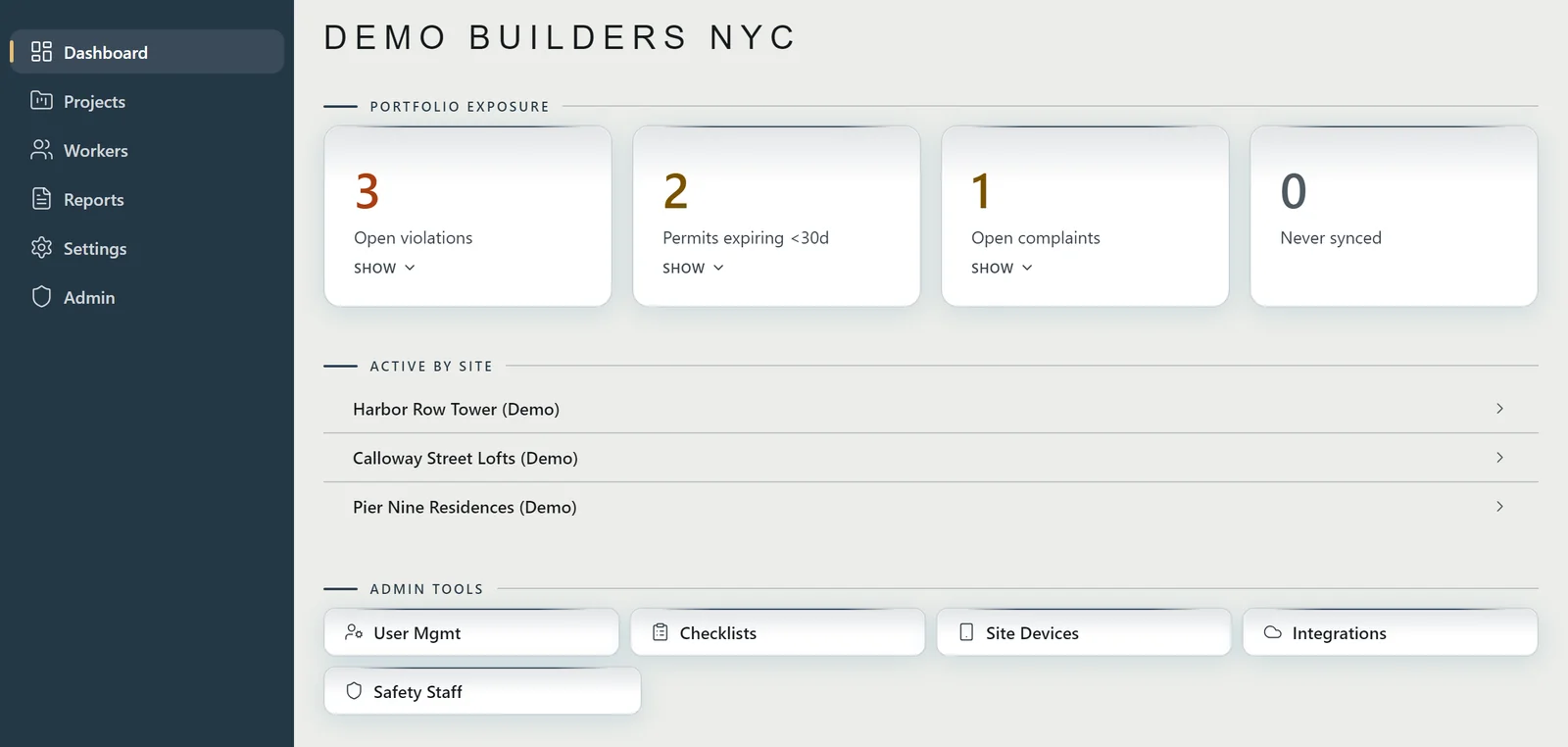
  • Every job on one screen. Open violations, permits expiring within 30 days and open complaints. Desktop browser only.

    Live
  • One morning message in WhatsApp. Admins and project managers who opt in get it at 7, 8 or 9 a.m.: what the city posted, what is waiting on you, who is waiting on whom, how many checked in, what is coming up. Quiet over Shabbos and Yom Tov by default.

    Live
  • Commitments read from the group chat. Who promised what and by when, each with the exact quote. They appear in the morning message.

    Beta
  • Ask the job’s history in a private WhatsApp message. Each answer is an exact quote from the job’s own messages and logs, with who said it and when. If it cannot find one, it says so.

    Live
  • Progress report. Weekly to quarterly, or on demand. See Reports

    Live
  • Languages. The app is in English. The worker page, the punch link and the signature pad are also in Spanish. Private WhatsApp answers and voice-note transcripts are in English, Spanish or Yiddish.

    Live
  • New York City only. The city records Levelog reads are New York City’s.

    Limit
  • No RFIs, submittals, budgets, invoicing or payroll. Keep the system you run those on.

    Limit
  • No turnstiles or badges. Check-in is a tag at the gate and the worker’s own phone.

    Limit
  • No login for an owner or investor. They read the daily report and the progress report their contractor sends.

    Limit
The Levelog dashboard on a desktop for a demo company: open violations, permits expiring within 30 days, open complaints, and the company’s three jobs
Every job on one screen. The real app, on a demo company. Where another product is the better tool

Try it on one job, beside the system you have.

Free. No commitment. How the beta works

Join the free beta